I am experiencing a critical connection issue with my Reachy 2. Yesterday, the robot was working perfectly. Today, it booted up, connected successfully for a brief moment, and then completely disconnected on its own without any intervention.
Here is a detailed step-by-step breakdown of the issue and the troubleshooting I have already performed:
1. IP & SSH Failure: I usually connect via SSH using ssh bedrock@192.168.100.16. This suddenly stopped working.
2. Web Interfaces Unreachable: Both the diagnostic page (http://192.168.100.16:5000/) and the dashboard (http://192.168.100.16:8000/robot) timeout and refuse to connect.
3. Hostname Fallback Failed: I tried pinging and connecting via SSH using the robot’s local hostname (<Reachy.2.name>.local), but it fails to respond.
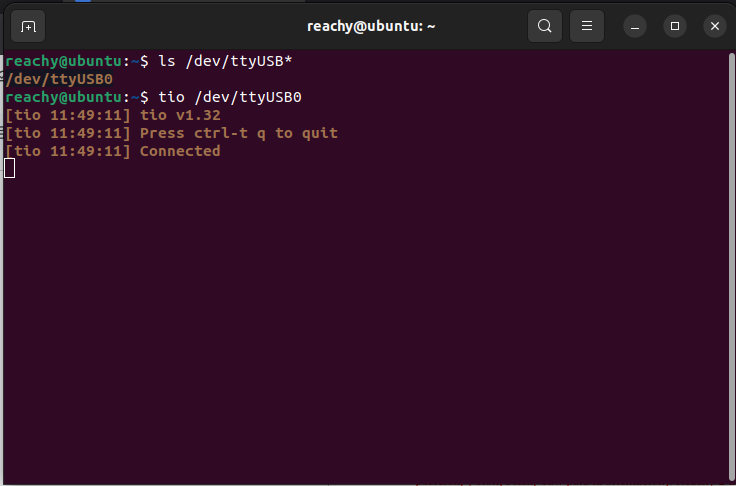
4. Emergency Serial Connection Failed: Assuming a network configuration issue, I attempted a direct hardware serial connection. I verified my permissions (sudo usermod -aG dialout $USER) and executed tio /dev/ttyUSB0. Unfortunately, it does not connect to the console at all.
Given that even the direct serial connection is unresponsive, I suspect the internal computer might have frozen or lost power.
Could you provide guidance on what physical components or internal logs I should check next to diagnose this?
Hi @alvaro_solana,
We are sorry to hear about your issue.
Could you confirm :
the LED in front of the power button is on ?
Reachy and your computer are connected on the same network ?
you are using the console cable provided by us ?
the id of the USB is correct in the tio command ? (you may need to adapt the ttyUSB#, depending on the other USB devices already connected to your computer)
Note that the first login attempt with tio often does not display anything but if you type something and press enter, usually the line asking you to type the login usually appears (login : bedrock, password: root)
Could you send us the screenshot of the console when you execute the command (tio /dev/ttyUSB0) ? and a photo of the LEDs of the bedrock when you turn it on ?
Network: My computer and Reachy were connected to the same Wi-Fi network. However, when I connect the LCD screen to the USB port on the mobile base, Reachy’s IP addresses do not appear at all.
Console Cable: I show two console cables in the video linked above, but I am not entirely sure if either of them is the official one provided by Pollen Robotics. Could you confirm if they look correct?
tio Command & Console: I have attached the screenshot of the console when executing tio /dev/ttyUSB0. Even after pressing ‘Enter’ multiple times and trying to type, the terminal just hangs and remains completely unresponsive.
When I power on the robot, it does perform the initial calibration movement. This confirms the motors are getting power.
For the LCD screen, did you try to reboot the robot completely with the screen plugged (so press the emergency button, and unpress the black switch for the bedrock and the mobile base button, then turn it back on) ? Is still searching for connexion ?
To be sure it’s not only a wifi disconnection, could you try on a routeur with Ethernet cables on the robot and your computer ? (you don’t need to have internet on the routeur)
First, check that the LED in front of the ethernet cable is flashing on the bedrock
then tell us if you can ssh to the bedrock or get the dashboard, with either the IP address if the LCD screen shows it, either the hostname.
First of all, I apologize for the delay in getting back to you.
I followed your instructions and connected both the robot and my computer to the router using Ethernet cables. Here are the results:
The LED in front of the Ethernet cable on the bedrock does turn on and flash.
However, the LCD screen still shows the “searching connection” message.
I tried accessing the dashboard and connecting via SSH, but it does not work.
Additionally, I noticed a new detail regarding the power buttons: when I press the black switch, the power LED does not light up. The power LED only turns on when I press the other white power button.
Please let me know what steps I should follow next.
Ok so it seems that the switch is defective. We can send you a new one with a tutorial video on how to replace it.
Just before that, I want to test some other things, because the fact that you can’t connect to the console is not normal :
Did you try with another cable, to be sure you don’t have a defective one ?
Could you try to connect with the console cable, and reboot entirely the robot (mobile base, emergency button and bedrock) and see if you get something on the console terminal ? And send us what’s happening.
Thank you for the follow-up. I have performed the tests you requested:
Console Cable: I tried with a different console cable to rule out a cable defect, but the result is exactly the same.
Reboot: I performed a full reboot (mobile base, emergency button, and bedrock) while connected, but there was no change in the behavior.
Terminal Unresponsiveness: When I run the command tio /dev/ttyUSB0, the terminal just hangs. I have attached a screenshot where you can see that even after pressing “Enter” multiple times and trying to type, the console remains completely unresponsive and no text is displayed.
Is there anything else you would like me to check?
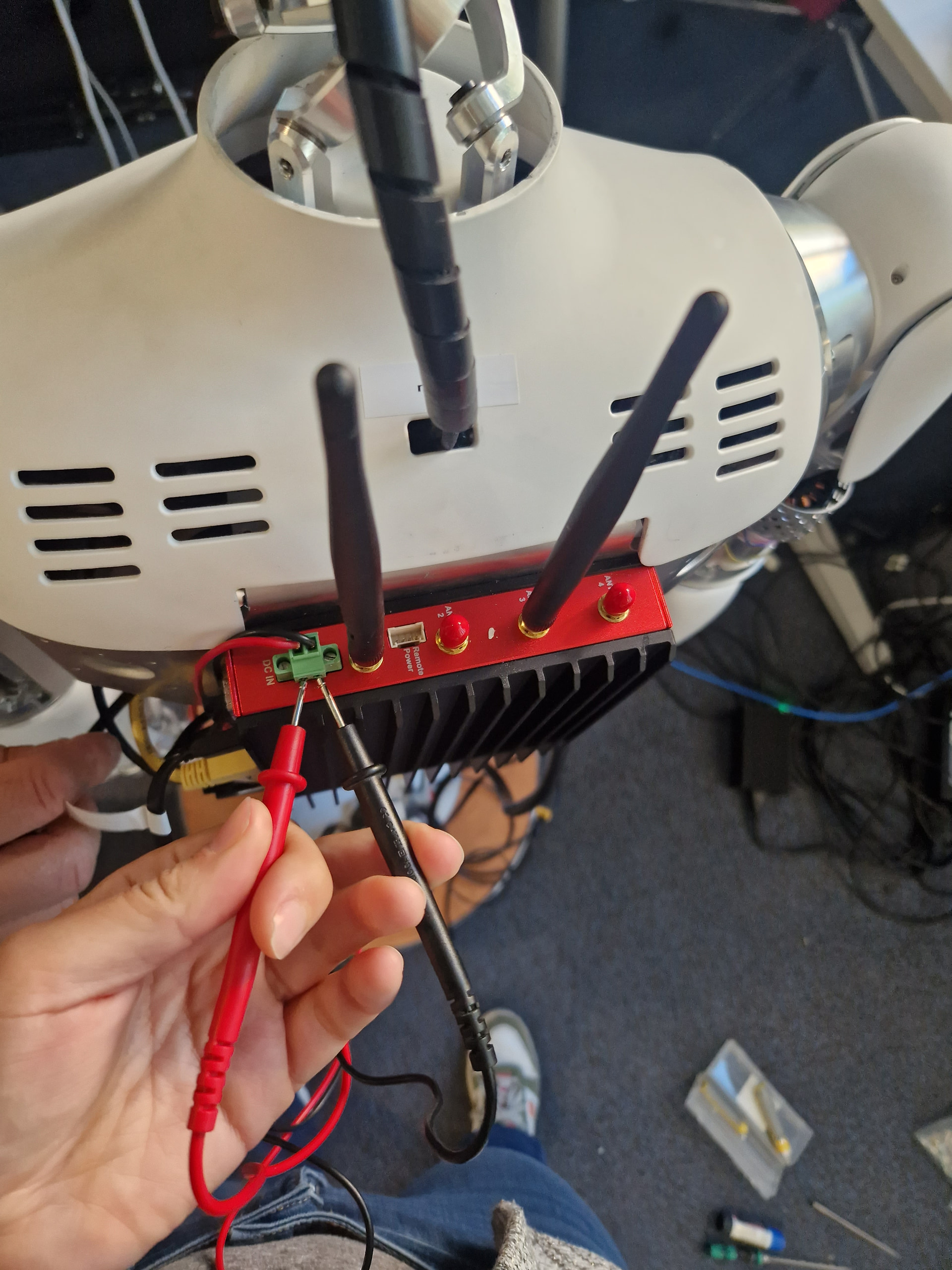
Hi @Claire, we also faced the same issue with the black button switch here at UCSD. The power terminal at the PC was dropping to around 6.8V. Thanks to this thread we looked at the black button switch, and saw that the black switch was measuring 1kOhm across the two terminals when it is supposed to connect the PC to power.
For now, we cut off the black button switch and shorted the wire where the black switch should be. This fixes the problem of PC dying and allows us to work with the robot for the moment. We are turning off the computer by unplugging the XT90 connector at the mobile base. Is there anything we should look out for safety-wise in this setup?
Also, seeing as how there are multiple robots affected by this switch, would it be possible for Pollen to consider a more robust component to replace the black button switch? In our (perhaps uniformed) view, the switch seems quite underrated for ~1A continuous/5A peak at 24V.
HI @lkm1321,
I’m sorry to hear that you’re facing the same issue.
You’re right, we realize that the switch isn’t robust enough, and we apologize for that. We are going to send you a new model of switch with a tutorial video on how to change it.
I keep you informed by mail.