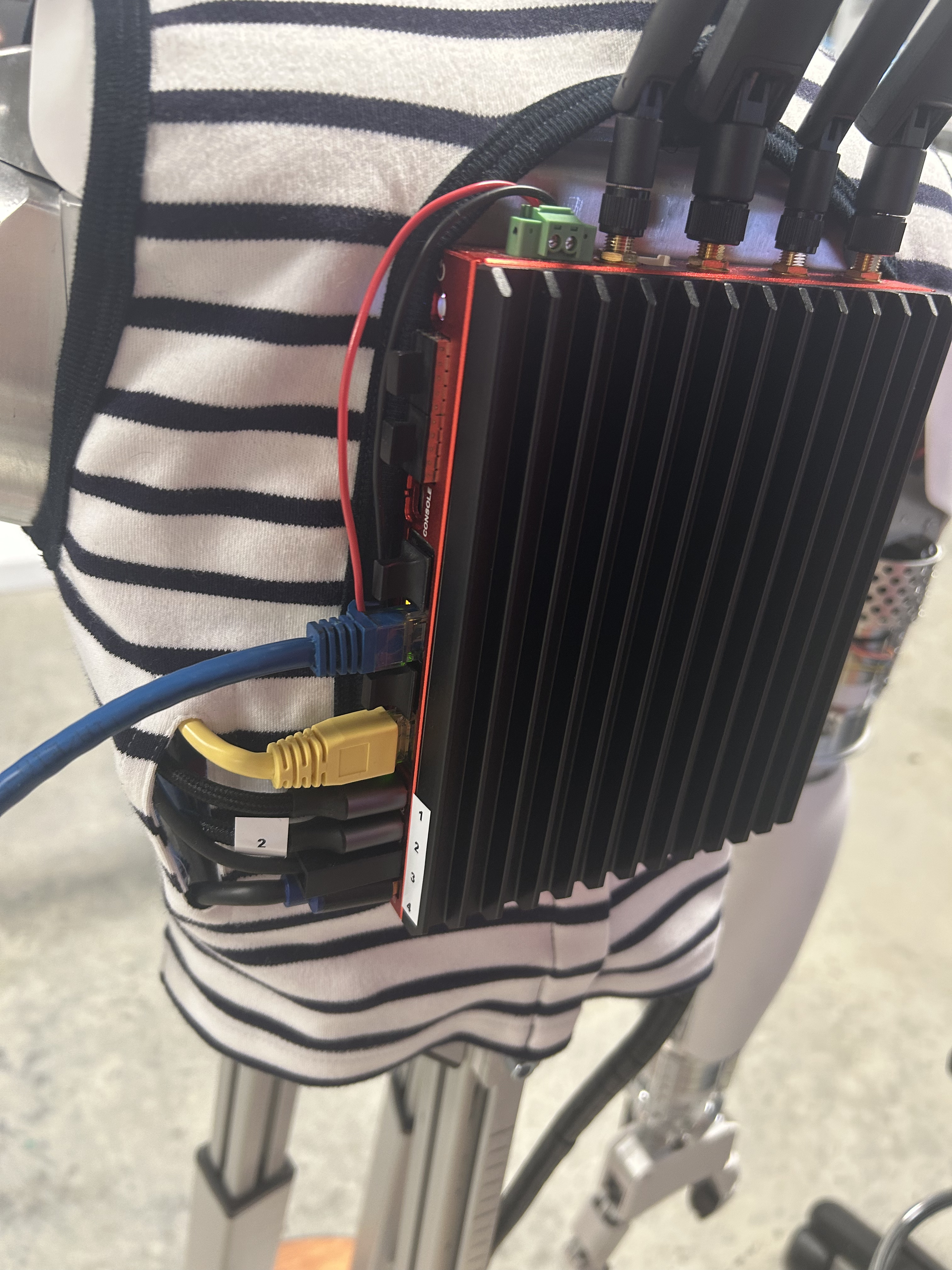
We are currently setting up teleoperation with Reachy 2. Everything seems to be connected correctly, and the teleoperation app starts successfully.
However, when I started teleoperation, only the right view of the stereo camera showed an image, while the left view was unavailable. There was also significant latency.
Our GPU is an NVIDIA GTX 1080 Ti, so we are wondering whether the issue could be related to GPU performance.
Has anyone experienced this before, or does anyone have suggestions for debugging it?
HI @Khal1L
Sorry to hear that you are having issues with your Reachy2.
Could you tell us the serial number of your Reachy? (r2-00XX)
Could you check on the dashboard (http://r2-00XX.local:8000/ on your browser), Media section, that you’ve got both cameras when you press connect on Teleoperation Cameras ?
Is your computer plugged when you are using teleoperation ?
Are you on wifi or ethernet connection to run teleoperation ? Could you tell us the ping interval (on the mirror scene, next to the IP address on the info section) : How to Use the Reachy 2 Teleoperation App)
Are you using the built release app or the code from Unity ? Which version is it (written under the Connect button at the app start) ?
Dashboard / cameras
In the dashboard Media section, after pressing Connect on Head Camera, we can see both stereo images, but the text still says “not available.”
The Torso page completely freezes, so we cannot press Connect there.
Computer plugged in / network / ping
We tried connecting through Ethernet, but it does not work. The dashboard shows Ethernet: no active connection, and the Ethernet IP 192.168.137.162 does not respond to ping.
So we are currently using Wi-Fi with IP 192.168.10.172. The ping in the mirror scene is around 41 ms.
Teleoperation app
We are using the built release app, version 1.1.2.
Headset
We are using a Meta Quest 3S.
Also, the robot system keeps shutting down unexpectedly.
Ok that means that the teleop camera is working well (the “not available” is a known issue of the front of the dashboard, it’s not an issue of your robot).
The latency is probably caused by your wifi network, which seems to be slow. I can’t figure out why you’re not getting an Ethernet connection. Have you tried using a different Ethernet cable and a different Ethernet port on the Bedrock? Can you try connecting the robot and your computer to a standalone router (even one without an internet connection)?
On this release app version and on our Quest3S, we have the stereo vision. Could you test on another app on your Quest that you’ve got the stereo vision, to see if maybe it’s an issue of settings ?
About the logs, I guess you copy/paste from the dashboard ? Could you maybe use the ssh connexion (where the logs are clearer for us) :
on a terminal, execute ssh bedrock@r2-0008.local (password: root)
execute journalctl -fu reachy2-core
restart the core service from the dashboard (Section services)
copy/paste all the logs of the journalctl until the errors
Quick update: after switching the Ethernet cable, the Ethernet connection now works.
With Wi-Fi off, r2-0008.local resolves to 192.168.137.14, ping works with 0% packet loss and <0.1 ms latency, and the dashboard is reachable at:
http://192.168.137.14:8000/
I can also enter teleoperation and control the robot normally over Ethernet now.
However, the original vision issue is still there, same as with wireless: in the Reachy app, I only get the right-eye view, and the left-eye view is black/not displayed. The camera image also jitters/shakes during teleoperation.
I also tested the Quest display outside the Reachy app. In the Quest home environment/ Reachy app mirror scene, I can see normally with both eyes, so the Quest display itself seems to be working. The issue seems to happen only inside the Reachy app during teleoperation.
So it looks like the problem is probably not caused by Wi-Fi/Ethernet connectivity or the Quest display hardware. Could you let me know what we should check next for the stereo camera stream or Reachy app rendering?
I couldn’t attach the log file here, so I sent the full reachy2-core log by email to support@pollen-robotics.com.
The log was recorded while entering teleoperation and reproducing the issue. It captured both the right-eye-only/jittering camera issue and a disconnection during teleop.
From what I saw, the camera seems to initialize correctly, but during teleop there are repeated [hal-4] [ERROR]: self.x_vel_goal : 0.0 messages, followed by a reachy_grpc_joint_sdk_server traceback, and then the core container stops/restarts around the disconnection.
To be sure there is no issue with the settings of your Quest 3S, could you test on another app where there is stereo vision, and not just the Quest home environment ?
Also, it can be an issue of Gstreamer installation : did you use the installer, and did GStreamer install correctly when you installed the app? You can try to reinstall the app to be sure.
Otherwise you can download it directly : https://gstreamer.freedesktop.org/download/#windows, then check that the environment variable PATH contains C:\gstreamer\1.0\msvc_x86_64\bin (default installation) For that, look for “Edit the system environment variables” in the Windows search bar. Then, click on Environment variables. A new window shows up : double click on “Path” in the user variables. If you don’t see the gstreamer variable, select “New” and add the pathway above.
Reboot after installation.
About the logs, I’m sorry I don’t see the mail with the new logs; I have the last one but where we can’t see the start of the error unfortunately. (the log about self.x_vel_goal is not a concern)
I tested stereo vision in other Quest apps, and stereo vision works normally there. The issue only appears in the Reachy app during teleoperation.
I also checked GStreamer on the Windows PC, and it seems to be installed and working correctly. gst-launch-1.0 --version and gst-inspect-1.0 --version both show GStreamer 1.26.11. The test pipeline gst-launch-1.0 videotestsrc ! autovideosink runs successfully and displays the normal test pattern using the Direct3D12 renderer on the NVIDIA GTX 1080 Ti. I also confirmed that udpsrc, rtph264depay, and avdec_h264 are available.
I just sent another email with the log file attached. The email title is: “Follow up on the previous Reachy2 teleoperation issues”. I have also attached the log file here.
I’m not sure I understand your last message: does the teleoperation with stereo vision work on your computer?
About the logs, it appears that the issue stems from the EtherCAT communication. Could you tell us what happens when the error occurs on the robot: do the motors suddenly lose power and do the arms drop down violently, or do they drop slowly? And do the joints perform their calibration (as they do when you release the emergency stop button)?
First, what I said another day is that the same setup pipeline worked on another computer, my laptop with an RTX 3060 GPU. So I think the issue may be related to the desktop hardware or configuration, rather than only the robot/app setup itself.
I also tested teleoperation several more times. The behavior seems to fall into two main cases:
If I enter teleoperation and wait for a while before moving the arms, the core seems more stable. In those runs, it never shut down. However, the other issues are still present: camera view problems, occasional latency, and sometimes the arms stop responding while the grippers and head can still move.
If I enter teleoperation and start moving the arms immediately, the core is much more likely to break down unexpectedly. In the worst case, it broke down before I could even move the arms. After the last breakdown, I could not even use “set default” from the dashboard, because the robot computer/core started restarting repeatedly.
Also, when the breakdown happens, the arms slowly drop down. It does not look abrupt or violent. It looks more like the arms switch into compliant mode and slowly move down due to gravity. I also did not observe the calibration motion like when releasing the emergency stop button.
I have recorded the corresponding logs for these cases and sent them over.
no-vision-with-breakdown-log
In this run, after entering teleoperation, I could not see the camera view in both eyes. The arms could move normally at the beginning, but then the core/motor connection broke down. After the breakdown, the arms slowly dropped down slowly.
reachy-arm-dead-log
In this run, there was no core breakdown during the whole session. Teleoperation kept running, but after a while the arms stopped responding. However, the head and grippers still worked normally. In the corresponding log, I saw messages like l_arm Emergency state and EMERGENCY STOP: joints are not continuous.
These two logs seem to represent the two main failure modes I observed today.
Ok, great to hear that you’ve got a set up that works for the teleoperation app ! For the other computer, as I told you before, you can try to reinstall the app and if that’s still not working, reinstall GStreamer from their download page.
For the error of the core, this seems to point to a faulty EtherCAT cable: could you try restarting the core, then gently wiggling the yellow cable on the EtherCAT port of the Bedrock to see if the error you’re seeing reappears? (as shown in the screenshot)
For the error of the arm, the emergency freeze is triggered when the system detects a significant variation in the position or rotation of the effectors between two commands. Do you make very rapid movements or move into extreme positions (such as changing the rotation of your wrists when the arms are outstretched, or rotating the Quest controllers in your hand)? Could you describe the movements you make when the emergency freeze occurs?
First, teleoperation works properly on my laptop now. There is no breakdown/disconnection, both eyes display correctly in the headset, and the latency is acceptable. So the teleoperation issue seems specific to the desktop.
For the EtherCAT/core issue, I tested the yellow cable (shown in the attached photo) five times. Only reachy2-test-EtherCAT-1.txt triggered a failure: it showed a timeout around NeckOrbita3d / slave 0, followed by ros2_control_node crashing and multiple critical nodes failing. The other four tests seemed normal: the core restarted correctly, found all 7 slaves, and reported “Master and all slaves operational”.
Also, during the wiggle test, I moved the yellow cable much more than it would normally move during teleoperation, so I’m not sure this fully explains the normal teleop behavior.
For the arm emergency freeze, I believe it was due to the high latency. I was moving the arms normally, not making sudden or extreme movements. But because the feedback was delayed, the commands reaching the robot may have become less smooth, with larger jumps between updates, which likely triggered the emergency freeze.
I tried wiggling the yellow EtherCAT cable multiple times, but I could not reproduce the EtherCAT/core error that way. The core stayed up, EtherCAT kept running, and the system found all 7 slaves after restart.
I also tested teleoperation several times. The results were inconsistent: in one test, teleop had an arm freeze and later broke down, but the log did not look like the EtherCAT neck/slave 0 issue. In another test, teleop did not visibly break down, but the recorded core log showed the transient EtherCAT/neck error: Timeout while connecting to the Orbita3d PoulpeRemoteClient with id 0, followed by the neck hardware failing to initialize and ros2_control_node crashing.
I ran get_bus_state afterward, but by then the bus had recovered. It detected all 7 slaves, including NeckOrbita3d id 0, and reported no errors.
Since I am testing alone, it is difficult to teleoperate, watch the live core log, and run get_bus_state / ethercat slaves exactly when the error happens. I can record the full core log, but I have not been able to catch the transient EtherCAT failure live with the bus-state tools.
I’m attaching two logs:
reachy2-test-EtherCAT-0513-3.log: teleop arm freeze followed by breakdown, but not the same EtherCAT neck/slave 0 error.
reachy2-test-EtherCAT-0513-5.log: no visible teleop breakdown, but the core log shows the transient EtherCAT/neck error.
Hi @Khal1L,
Sorry for the delay and thanks for your detailed answer.
We are going to send you a new Ethercat cable to see if that solves the issue.
Could you please send an email to support@pollen-robotics.com with :
the name, email and phone number of the recipient
the complete address
I’ll send you a tutorial video for the replacement.
Once again, we apologize for this issue,
Thank you @Claire for helping @Khal1L. I sent an email RE: the Ethercat cable. I just wanted to follow up because I think some of the issues could be hardware but some of them I think could be not related to hardware.
Fixed
For the stereo view issue, installing gstreamer 1.28 version with teleop app 1.12 seems to fix this. From our tests, 1.27+ works and 1.26 and below does not. Note 1.27 is superseded by 1.28. I want to flag that gstreamer 1.28 does not ship with the Windows installer by default. The video stream is quite good on both 5G WiFi and Ethernet. However, we stuck to Ethernet for the rest of debugging below.
Remaining issues
We still have three issues that are unique with teleoperation. We are still able to use the robot through the SDK. Let me know if you want to manage these in a separate thread:
The core container dies during teleop only.
The logs show the first process to die is ethercat_master_server, after slaves not being found. The lost slaves seems to be contiguous in number (from N to 6), but not always the same. So something like slaves 1 to 6 not found (i.e. N=1) or slaves 5 to 6 not found (i.e. N=5). I have seen N=0 cases too. This is intermittent and difficult to reproduce. Tried to reproduce with throttling CPU (to rule out battery) or loading CPU/memory (to rule out CPU contention), but not solid. CPU throttling/loading increased frequency of datagram UNMATCHED in kernel logs, but no crashes in ethercat_master. Reducing the unmatched datagram messages with RT kernel did not help (see below). Even tried correlation with heavy WiFi usage emulated with iperf3 (although we are using ethernet for teleop). Does not reproduce.
This is Claude’s summary of the log
``` 08:39:56.93 all 7 slaves healthy - “commands ~500/s, command time 2ms” 08:39:57.07 ethercat_master_server: “Not all slaves connected! Expected: 7, Responding: 1” 08:39:57.075 server: “Master cannot go to operational!” 08:39:57.077 ethercat_master_server process DIES - exit code 10 08:39:57.076 client.rs:210 unwraps the resulting broken-pipe Err → PANIC (x7 tokio workers) 08:39:58.19 ros2_control_node dies - exit code -11 (SIGSEGV) 08:40:xx launch tears the whole robot down
```
Significant buffering in motor commands during teleop (does not happen in SDK or ROS2).
Even after the operator moves, the robot does not move for quite some time, and then abruptly moves. Looking at the Reachy2Teleoperation.log shows a lot of dropped SCTP packet presumably for the control commands. This happens almost always. The newer version of gstreamer made video smoother, but control worse. Mobile base and gripper commands seem more responsive.
We occasionally see warning messages in the VR teleop app that says the protocol for messages do not exactly match, and we may need to update the webrtc image. We are currently on 2.0.1.2_release for webrtc, and 1.1.2 for VR Teleop. I tried 2.1.0.1_development for webrtc. Robot shows as connected in the transition room, but the joints do not move once teleop starts.
Attempted software solutions so far
For 1 and 2,
I saw some log messages for NetworkManager trying to modify the Ethercat port enp5s0, So, made this independent of NetworkManager, and put to a fixed state in netplan rendering with networkd. Added additional settings to improve determinism, such as no interrupt coalescing, and no pause frames through ethtool -C and ethtool -A.
I suspected this is due to CPU contention and tried: a) installing RT kernel (along with rebuilding the ethercat kernel modules, and b) isolating one CPU each for the Ethercat IRQs and the userspace ethercat_master_server server thread, with RT priority. This did not help with the ethercat_master_serverdying, although the ethernet control rate went from ~930±10Hz => ~995±2Hz. We noticed that this made the video stream smoother in teleop, but controls actually more buffered.
Another suspicion was ec_generic kernel module for ethercat may be underperforming under load, so I tried installing ec_igc kernel module specific to the ethernet module on the bedrock computer. The ec_igc kernel module loads up, but does not find any slaves. Have you tried this internally?
For 3
We tried giving 2.1.0.1_development the same ROS2 flags as core after noticing the new version seems to do more ROS2 stuff. Did not move the robot still. How do we get this to move the robot?