I’m currently working on a project where I would like to run three Reachy2 simulations simultaneously(in unity), each within its own Docker container. My goal is to assign different host IPs and ports, for example, 50051, 50052, and 50053, so that I can communicate with all three simulated robots independently within the same project environment.
Hello @AAK,
Thank you for reaching out to us! We’d loved to hear more about your project!
We have looked into your question, and the way to do it depends on how you use Docker.
Are you using Docker on Linux?
For Linux:
- Setting up the ports
You can launch the following command, for robot1:
docker run --rm --name core-robot1 --privileged --ipc=host --env DISPLAY=$DISPLAY --env QT_X11_NO_MITSHM=1 -v /tmp/.X11-unix:/tmp/.X11-unix:rw -v /dev:/dev -v $PWD/test_override:/home/reachy/.reachy_config_override --group-add audio --device-cgroup-rule='c 189:* rmw' -p 50052:50051 -p 50075:50065 -p 50073:50063 pollenrobotics/reachy2_core:1.7.5.9_release /package/launch.sh start_sdk_server:=true fake:=true start_rviz:=true
Using-p 50052:50051 exposes port 50052 on your host, while it remains mapped to port 50051 inside the Docker container.
To launch another container for robot2 (do not forget to change the --name of your container), you can run:
docker run --rm --name core-robot2 --privileged --ipc=host --env DISPLAY=$DISPLAY --env QT_X11_NO_MITSHM=1 -v /tmp/.X11-unix:/tmp/.X11-unix:rw -v /dev:/dev -v $PWD/test_override:/home/reachy/.reachy_config_override --group-add audio --device-cgroup-rule='c 189:* rmw' -p 50053:50051 -p 50085:50065 -p 50083:50063 pollenrobotics/reachy2_core:1.7.5.9_release /package/launch.sh start_sdk_server:=true fake:=true start_rviz:=true
Here, port 50053 is mapped to the SDK port inside the container.
Please also note that the video port (50065) and audio port (50063) are remapped as well.
With this, you won’t see the RViz windows by default, but you can enable them by running the following command before launching the containers:
xhost +local:docker
The IP addresses of the robots are the same, but it works as they communicate on different ports.
- Controlling the robots through the Python SDK
If you want to control them through our Python SDK, for the moment you will need to switch to this new branch for the moment: GitHub - pollen-robotics/reachy2-sdk at fix-ports-setup
You can instantiate your robots like this:
from reachy2_sdk import ReachySDK
robot1=ReachySDK(“localhost”, sdk_port=50052, video_port=50075, audio_port=50073)
(specify the correct IP and ports)
For Windows:
If you followed the documentation for installing the simulation and are using Docker Desktop, things are even easier.
When setting up your container, you can directly select the new ports in the Optional settings (make sure you never assign the same port twice):
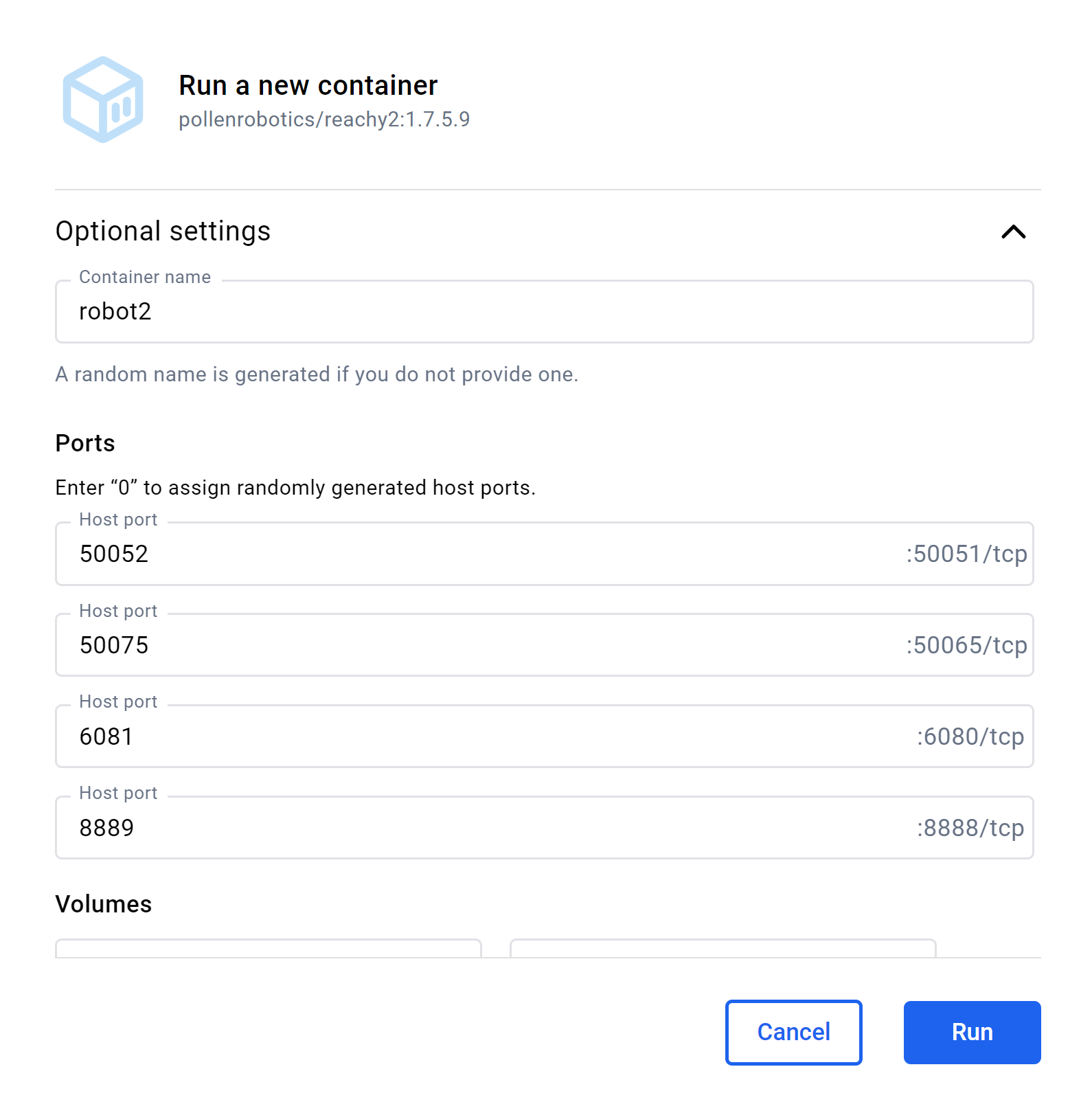
This way, you can run several containers at the same time, each one simulating a different robot:
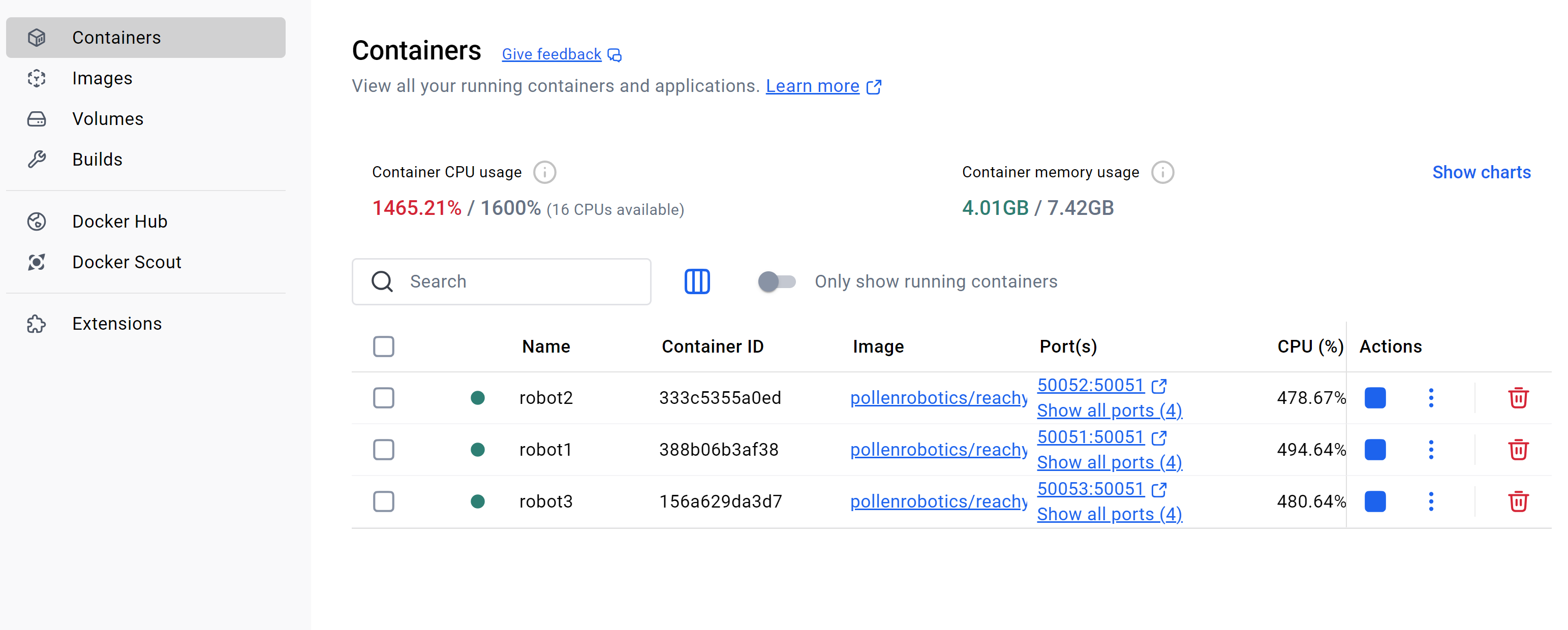
To control the robots through our Python SDK, use the branch mentioned in part 2 (Controlling the robots through the Python SDK) of the previous message!
Hello, I appreciate such detailed solution. I have three docker container, I tried directly through desktop but was not able to run all three through docker desktop but I ran the three docker container using the commands below:
docker run --rm --platform linux/amd64 -p 8888:8888 -p 6080:6080 -p 50051:50051 --name reachy2 ``docker.io/pollenrobotics/reachy2`` start_rviz:=true start_sdk_server:=true fake:=true orbbec:=false gazebo:=true
docker run --rm --platform linux/amd64 -p 8889:8888 -p 6081:6080 -p 50052:50051 --name reachy2 ``docker.io/pollenrobotics/reachy2`` start_rviz:=true start_sdk_server:=true fake:=true orbbec:=false gazebo:=true
docker run --rm --platform linux/amd64 -p 8890:8888 -p 6082:6080 -p 50053:50051 --name reachy2 ``docker.io/pollenrobotics/reachy2`` start_rviz:=true start_sdk_server:=true fake:=true orbbec:=false gazebo:=true
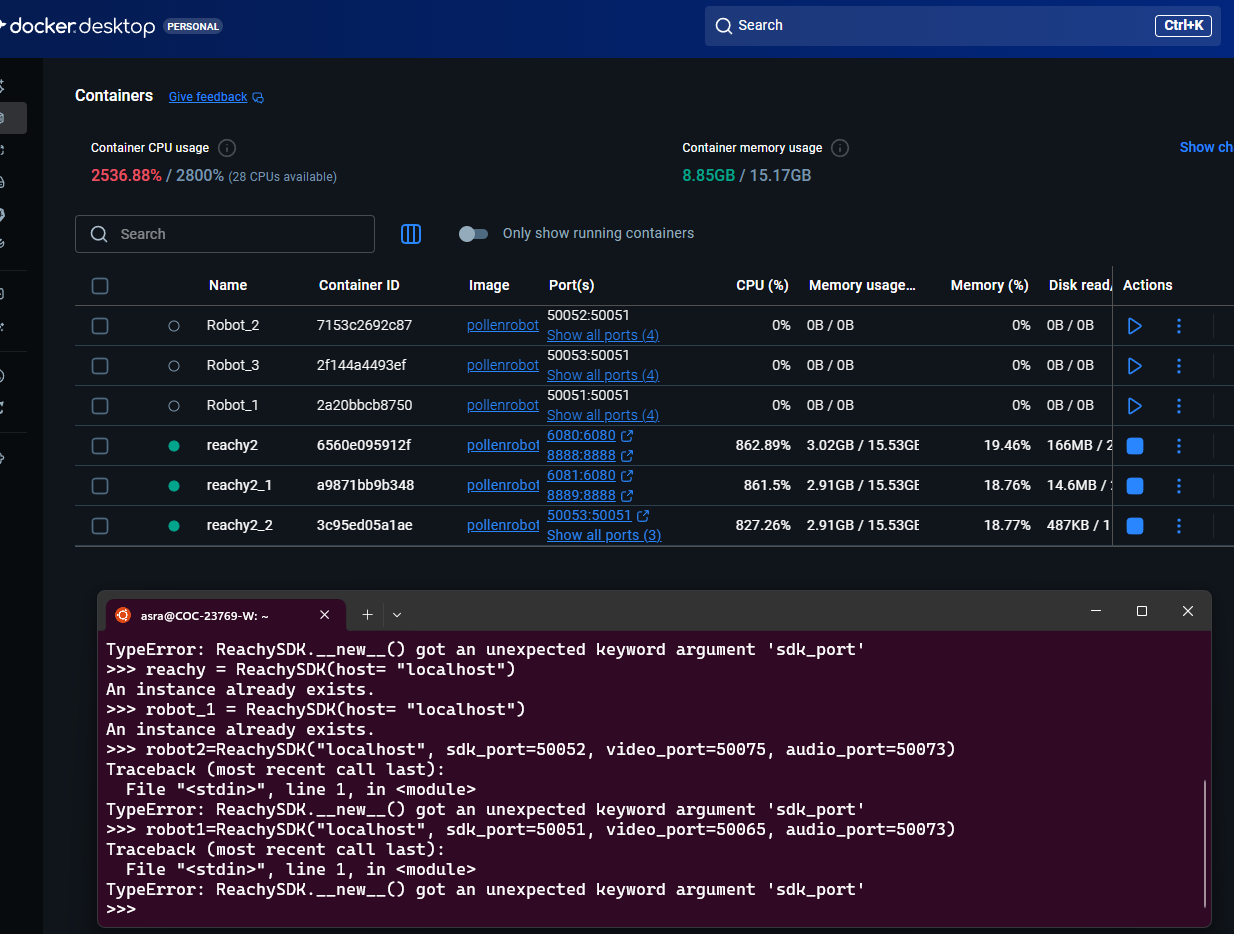
As guided above for controlling the three reachy2 in unity using python sdk, I am running the commands above and having an error:
Can you please guide me. Thank you!
Hello @AAK,
Did you change the branch of reachy2_sdk as mentioned in the part “2. Controlling the robots through the Python SDK“?
The branch must be set to fix-ports-setup GitHub - pollen-robotics/reachy2-sdk at fix-ports-setup , otherwise you will get the error “TypeError: ReachySDK.__new__() got an unexpected keyword argument ‘sdk_port’”, which seems to be the error you have.