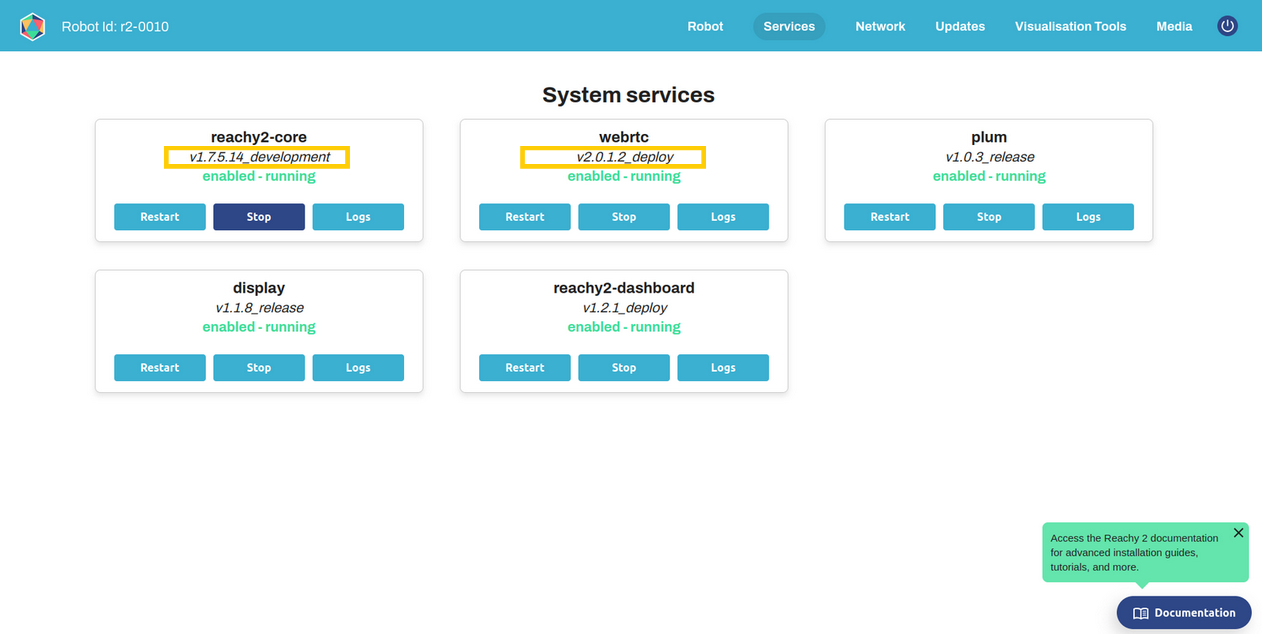
Reachy 2 mobile base issue: SetSpeed service not available

Hi Pollen Robotics team,

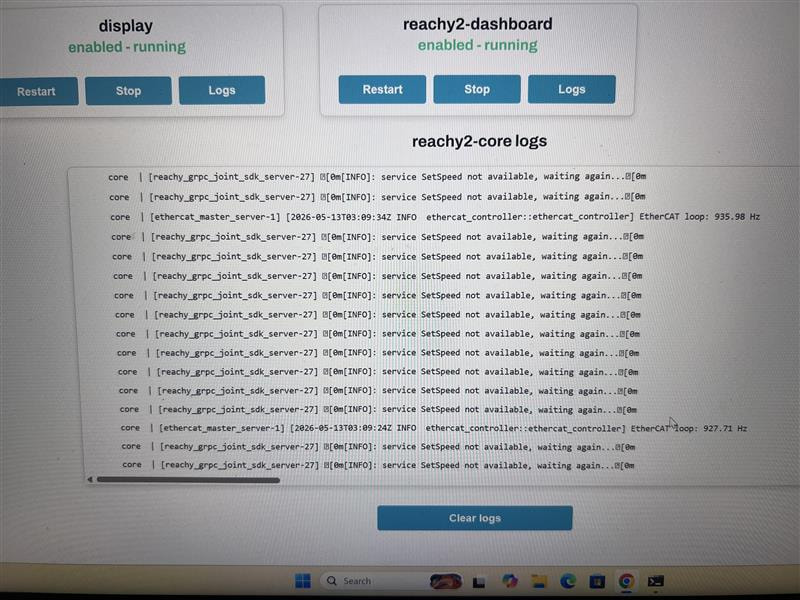
I am having an issue with the Reachy 2 mobile base. The dashboard can open and I can SSH into the robot, but when the mobile base is enabled, the core logs repeatedly show:

service SetSpeed not available, waiting again...

The Python SDK also cannot properly connect to/control the robot when this happens.

Current setup

I am connected to Reachy through SSH:

ssh bedrock@reachy2-pvt01.local

The config file is located at:

/home/bedrock/.reachy_config/reachy.yaml

The mobile base section originally had:

mobile_base:
  version_hard: 1.2
  serial_number: MB-001
  version_soft: 1.1

When I temporarily set:

mobile_base: null

and restart reachy2-core, the robot core works better for head/arms. But when I enable the mobile base again, the SetSpeed not available issue returns.

What I checked

I ran:

ls /dev | grep vesc

but nothing appears.

I also checked:

ls -l /dev/vesc_wheels

and it returns:

No such file or directory

So it seems /dev/vesc_wheels is not being created/detected.

I also checked the serial devices:

ls -l /dev/serial/by-id

and I can see two FTDI USB serial converters:

usb-FTDI_USB__-__Serial_Converter_FT94EN9J -> ../../ttyUSB1
usb-FTDI_USB__-__Serial_Converter_FT94ENR0 -> ../../ttyUSB0

I tried temporarily linking each one to /dev/vesc_wheels:

sudo ln -s /dev/ttyUSB0 /dev/vesc_wheels
sudo systemctl restart reachy2-core

and also:

sudo ln -s /dev/ttyUSB1 /dev/vesc_wheels
sudo systemctl restart reachy2-core

but both still resulted in the same SetSpeed not available issue.

I removed the temporary link after testing:

sudo rm -f /dev/vesc_wheels

Other logs noticed

At one point, I also saw Dynamixel timeout messages such as:

dynamixel_controller error
get_motors_temperature timeout
get_current_torque timeout
get_current_velocity timeout
left dx1 / right dx1 timeout

However, the main repeated issue when enabling the base is still:

service SetSpeed not available, waiting again...

Physical checks done

I checked the following:

- Mobile base power is on
- Emergency stop is released
- USB devices are detected as ttyUSB0 and ttyUSB1
- Reachy dashboard is reachable
- SSH access works

Question

Could you please advise what the correct expected device mapping should be for the mobile base on Reachy 2?

Specifically:

1. Should /dev/vesc_wheels be automatically created by a udev rule?
2. How can I identify which FTDI device is the mobile base controller?
3. Is there a service or udev rule I should restart to recreate /dev/vesc_wheels?
4. Could this be a mobile base firmware/power/USB hub issue instead?
5. Are there any official commands to test the mobile base controller directly?

For now, I can keep mobile_base: null to use the upper body, but I would like to restore the mobile base properly.

Thank you.
Hi @bannc ,
Sorry to hear you’re experiencing issues with your Reachy2

Thanks a lot for the detailed message !

  • Could you tell me if previously the mobile base was correctly working ? And if something happened before you get those errors ?

  • Could you please try to get the lidar ? ls /dev/rplidar_s2

  • Could you try to search the vesc by their idVendor ? sudo find /sys -name "idVendor" -exec grep -l "0483" {} \;

  • Could you tell me what’s inside the udev rules of your robot : cat /etc/udev/rules.d/10-reachy-local.rules

  • And could you copy/paste the entire logs from journalctl -fu reachy2-core from the moment you restart the core service ?

Thanks a lot !
Claire

Hi Claire,

Thanks a lot for your reply.

I ran the checks you asked for.

  1. Previous status

From what I knew, the robot was working properly last August. However, I am not fully sure about the exact mobile base status because I only started testing this robot recently.

Currently, the upper body/head/arms can move through the dashboard. The issue appears when I enable the mobile base.

  1. Lidar check

Command:

ls /dev/rplidar_s2

Output:

ls: cannot access ‘/dev/rplidar_s2’: No such file or directory

So the lidar is not detected.

  1. VESC idVendor check

Command:

sudo find /sys -name “idVendor” -exec grep -l “0483” {} ;

Output:

No output was returned.

I also checked:

lsusb | grep 0483

Output:

No output was returned.

So I cannot see the expected VESC device with vendor ID 0483.

  1. Udev rules

Command:

cat /etc/udev/rules.d/10-reachy-local.rules

The rule for vesc_wheels is present. It expects:

idVendor==“0483”
idProduct==“5740”
product==“ChibiOS/RT Virtual COM Port”

and should create:

/dev/vesc_wheels

However, since the 0483:5740 device does not appear in lsusb, /dev/vesc_wheels is not created.

  1. Core logs

I also captured the logs from journalctl after restarting reachy2-core.

The main errors I noticed are:

  • poulpe_ethercat_grpc::client reports “Connection refused”
  • ros2_control_node reports errors connecting to EthercatPoulpeController / PoulpeRemoteClient
  • several hardware config files fail to load, including neck_beta.yaml and the shoulder/elbow/wrist poulpe config files
  • ros2_control_node dies with:

Wrong state or command interface configuration

  • The logs also show many missing state and command interfaces.

The Orbbec camera is detected correctly, and the upper body can still move through the dashboard, but the mobile base devices seem missing:

  • /dev/rplidar_s2 is missing
  • /dev/vesc_wheels is missing
  • lsusb | grep 0483 returns nothing
  • the udev rule exists, but the expected 0483:5740 VESC device is not detected

Could this point to a mobile base USB hub/cable/power issue, since both the lidar and VESC device are missing?

Thanks a lot.

Hi Claire,

Small update on the Reachy2 Teleoperation app side.

After checking the robot core container, I matched my local Python SDK versions with the robot-side versions:

  • reachy2-sdk: 1.0.7
  • reachy2-sdk-api: 1.0.11

After doing this, the Python SDK works correctly. It connects successfully and can read motor information from the robot.

For example, the SDK shows:

  • Connected: True
  • Head: on=True
  • Right arm: on=True
  • Left arm: on=True
  • Joint present positions and goal positions are available for the head, right arm, and left arm

I can also move the upper body/head/arms through the dashboard.

However, the Reachy2 Teleoperation app still shows:

  • “No motors information”
  • “Reachy is not ready yet”
  • “Some required robot services are not available, teleoperation is not possible”

The Teleoperation app version shown is:

  • Application Version: 1.1.0

From docker ps, the relevant containers appear to be running:

  • core
  • webrtc_streaming_playback_ros
  • grpc-webrtc-bridge
  • webrtc_signalling
  • reachy2-dashboard
  • display/plum-related services

I am connecting to the robot in the Teleoperation app using the robot’s local network IP address, not the .local hostname.

Since the SDK and dashboard can both access the upper-body motor information, could this be a Teleoperation app / WebRTC / bridge compatibility issue? Or is there another service required by the Teleoperation app that I should check?

Thanks a lot.

Hi @bannc,
So sorry for the delay, we missed your messages !
It seems that there is an issue with the detection of the mobile base.

  • Could you please make sure that the black cable running from the mobile base to the last USB port on the bedrock is properly connected?
  • And could you try replacing it to see if that resolves the issue?

If that doesn’t fix the problem, we’ll send you a tutorial on how to access the inside of the mobile base and test the USB hub located there.

For the teleoperation :

  • are you trying to enter the app with the mobile base disabled ?

  • Could you tell us the version of reachy2-core and webrtc you are using ?

  • And could you send the entire logs :
    For that, you can ssh to your robot, then execute journalctl -fu reachy2-core for the core and journalctl -fu webrtc for the webrtc.

Thanks and have a good day,
Claire

Hi @Claire,

Yes, I am trying to enter the Reachy 2 teleoperation app with the mobile base disabled.

Robot / connection information:

  • Robot hostname: reachy2-pvt01

  • SSH user: bedrock

  • Robot IP used during testing: 10.116.19.109

  • Dashboard is reachable from the browser

  • Mobile base is intended to be disabled

Docker versions currently running on the robot:

NAMES                           IMAGE                                                      STATUS
webrtc_streaming_playback_ros   pollenrobotics/webrtc:1.2.34.1                             Up 4 hours
grpc-webrtc-bridge-con          pollenrobotics/webrtc:1.2.34.1                             Up 4 hours
webrtc_signalling               pollenrobotics/webrtc:1.2.34.1                             Up 4 hours
plum                            pollenrobotics/plum:0.21.1                                 Up 4 hours
display                         europe-docker.pkg.dev/pollen-robotics/display/main:1.1.7   Up 4 hours
core                            pollenrobotics/reachy2_core:humble_1.7.3.18                Up 4 hours
reachy2-dashboard               pollenrobotics/reachy2-dashboard:1.0.0                     Up 4 hours

Version summary:

  • reachy2-core: pollenrobotics/reachy2_core:humble_1.7.3.18

  • WebRTC: pollenrobotics/webrtc:1.2.34.1

  • Dashboard: pollenrobotics/reachy2-dashboard:1.0.0

  • Plum: pollenrobotics/plum:0.21.1

  • Display: europe-docker.pkg.dev/pollen-robotics/display/main:1.1.7

Commands I used to collect logs:

journalctl -u reachy2-core -n 500 --no-pager -l > reachy2-core-recent.log
journalctl -u webrtc -n 500 --no-pager -l > webrtc-recent.log
docker logs webrtc_streaming_playback_ros --tail 500 > webrtc_streaming_playback_ros.log
docker logs grpc-webrtc-bridge-con --tail 500 > grpc-webrtc-bridge-con.log
docker logs webrtc_signalling --tail 500 > webrtc_signalling.log
docker logs core --tail 500 > core-docker.log

Generated log files:

-rw-rw-r-- 1 bedrock bedrock 70K Jun 18 06:55 core-docker.log
-rw-rw-r-- 1 bedrock bedrock   0 Jun 18 06:54 grpc-webrtc-bridge-con.log
-rw-rw-r-- 1 bedrock bedrock 95K Jun 18 06:50 reachy2-core-recent.log
-rw-rw-r-- 1 bedrock bedrock 87K Jun 18 06:51 webrtc-recent.log
-rw-rw-r-- 1 bedrock bedrock 73K Jun 18 06:55 webrtc_signalling.log
-rw-rw-r-- 1 bedrock bedrock   0 Jun 18 06:53 webrtc_streaming_playback_ros.log

Important WebRTC / DDS error observed repeatedly:

ddsi_udp_conn_write to udp/10.116.19.109:7671 failed with retcode -1

This repeated many times in the WebRTC streaming output, for example:

1781755511.552422 [1] streaming_: ddsi_udp_conn_write to udp/10.116.19.109:7671 failed with retcode -1
1781755511.552427 [1] streaming_: ddsi_udp_conn_write to udp/10.116.19.109:7671 failed with retcode -1
1781755511.552433 [1] streaming_: ddsi_udp_conn_write to udp/10.116.19.109:7671 failed with retcode -1
1781755511.552438 [1] streaming_: ddsi_udp_conn_write to udp/10.116.19.109:7671 failed with retcode -1
1781755511.552444 [1] streaming_: ddsi_udp_conn_write to udp/10.116.19.109:7671 failed with retcode -1
1781755511.552450 [1] streaming_: ddsi_udp_conn_write to udp/10.116.19.109:7671 failed with retcode -1
1781755511.552457 [1] streaming_: ddsi_udp_conn_write to udp/10.116.19.109:7671 failed with retcode -1
1781755511.552838 [1] streaming_: ddsi_udp_conn_write to udp/10.116.19.109:7671 failed with retcode -1
1781755511.552935 [1] streaming_: ddsi_udp_conn_write to udp/10.116.19.109:7671 failed with retcode -1
1781755511.610024 [1] streaming_: ddsi_udp_conn_write to udp/10.116.19.109:7671 failed with retcode -1

The same type of error also appeared for multiple UDP ports on the robot IP:

1781755516.225736 [1]        tev: ddsi_udp_conn_write to udp/10.116.19.109:7660 failed with retcode -1
1781755516.225751 [1]        tev: ddsi_udp_conn_write to udp/10.116.19.109:7662 failed with retcode -1
1781755516.225758 [1]        tev: ddsi_udp_conn_write to udp/10.116.19.109:7664 failed with retcode -1
1781755516.225765 [1]        tev: ddsi_udp_conn_write to udp/10.116.19.109:7666 failed with retcode -1
1781755516.225771 [1]        tev: ddsi_udp_conn_write to udp/10.116.19.109:7668 failed with retcode -1
1781755516.225777 [1]        tev: ddsi_udp_conn_write to udp/10.116.19.109:7670 failed with retcode -1
1781755516.225783 [1]        tev: ddsi_udp_conn_write to udp/10.116.19.109:7672 failed with retcode -1
1781755516.225789 [1]        tev: ddsi_udp_conn_write to udp/10.116.19.109:7674 failed with retcode -1
1781755516.225799 [1]        tev: ddsi_udp_conn_write to udp/10.116.19.109:7676 failed with retcode -1
1781755516.225809 [1]        tev: ddsi_udp_conn_write to udp/10.116.19.109:7678 failed with retcode -1
1781755516.225815 [1]        tev: ddsi_udp_conn_write to udp/10.116.19.109:7680 failed with retcode -1

The same type of error also appeared for localhost UDP ports:

1781755524.226805 [1]        tev: ddsi_udp_conn_write to udp/127.0.0.1:7882 failed with retcode -1
1781755524.226811 [1]        tev: ddsi_udp_conn_write to udp/127.0.0.1:7884 failed with retcode -1
1781755524.226816 [1]        tev: ddsi_udp_conn_write to udp/127.0.0.1:7886 failed with retcode -1
1781755524.226820 [1]        tev: ddsi_udp_conn_write to udp/127.0.0.1:7888 failed with retcode -1
1781755524.226823 [1]        tev: ddsi_udp_conn_write to udp/127.0.0.1:7890 failed with retcode -1
1781755524.226826 [1]        tev: ddsi_udp_conn_write to udp/127.0.0.1:7892 failed with retcode -1
1781755524.226830 [1]        tev: ddsi_udp_conn_write to udp/127.0.0.1:7894 failed with retcode -1
1781755524.226833 [1]        tev: ddsi_udp_conn_write to udp/127.0.0.1:7896 failed with retcode -1
1781755524.226836 [1]        tev: ddsi_udp_conn_write to udp/127.0.0.1:7898 failed with retcode -1

The grpc-webrtc-bridge-con container showed this startup sequence:

INFO:grpc_webrtc_bridge.server:Pipeline state changed from null to ready.
INFO:grpc_webrtc_bridge.server:Pipeline state changed from ready to paused.
INFO:grpc_webrtc_bridge.server:Pipeline state changed from paused to playing.
INFO:gst_signalling.gst_signalling:Connecting to ws://localhost:8443
INFO:gst_signalling.gst_signalling:Connected.
INFO:gst_signalling.gst_signalling:Starting input message handler.

There was also a command typo while checking Docker containers:

docker ps -a --firnat "table {{.Names}}\t{{.Image}}\t{{.Status}}"
unknown flag: --firnat
See 'docker ps --help'.

The correct Docker command worked:

docker ps --format "table {{.Names}}\t{{.Image}}\t{{.Status}}"

Since I am not attaching the log files here, I have copied the relevant terminal output directly into this message. Please let me know if you still need the raw .log files or a live capture while reproducing the teleoperation issue using:

journalctl -fu reachy2-core
journalctl -fu webrtc

Thanks a lot.

Hi @bannc

You can start by updating the versions of the services :

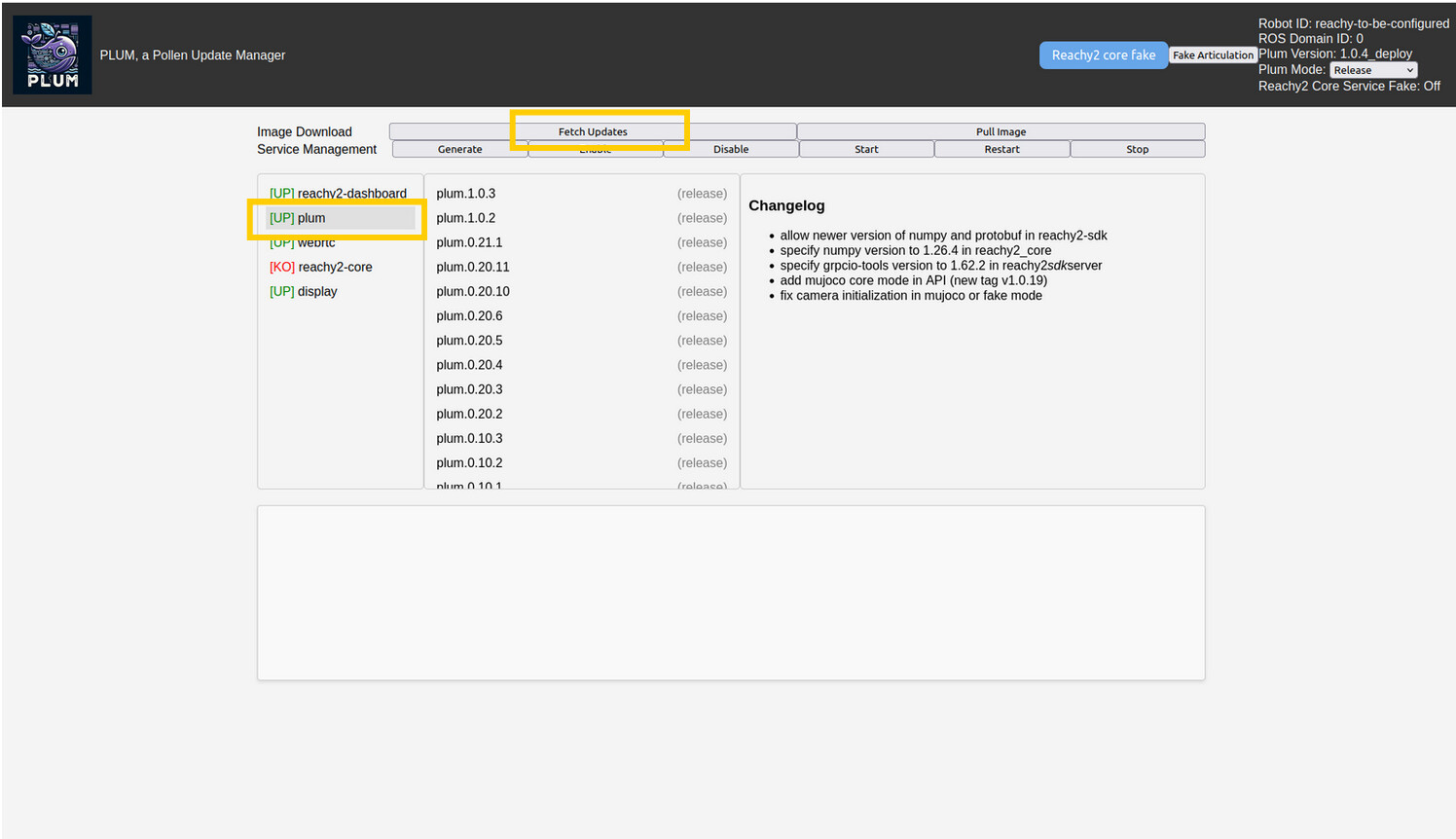
  1. Go to Plum : http://reachy2-pvt01.local:5000/

  2. Start by updating Plum service :
    a. Plum > Fetch Updates > plum.1.0.3 > Pull Image


    b. Wait for the image to be pulled (see the logs behind)
    c. Generate > Enable > Restart

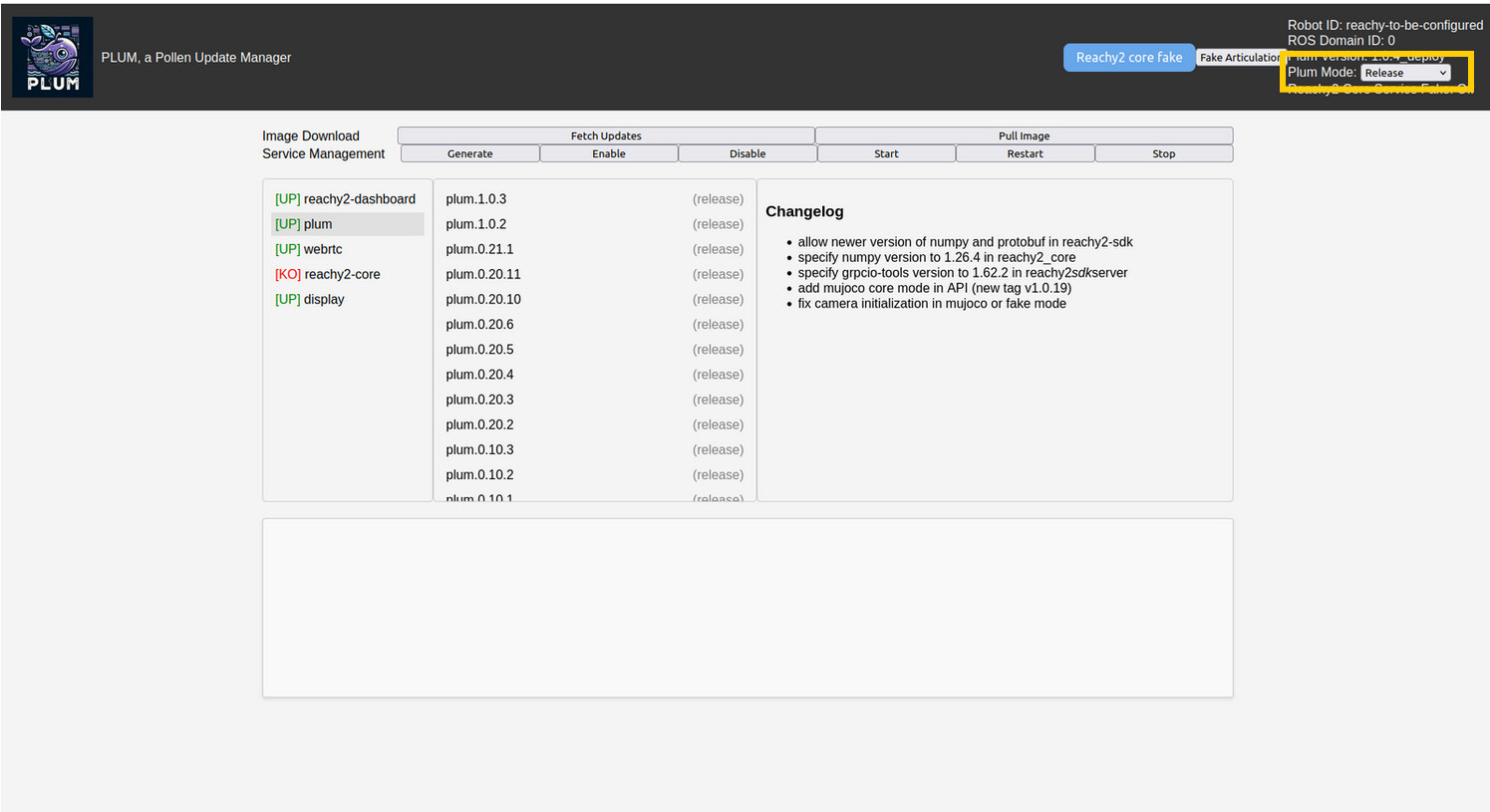
  3. Refresh your browser and make your Plum mode on Release

  4. Update with the same process each service :
    a. reachy2-dashboard : 1.2.1
    b. webrtc : 2.0.1.2
    c. reachy2-core : 1.7.5.9
    d. display : 1.1.8

If you need more informations, you can take a look on the documentation : How to Use Reachy 2 Dashboard for Updates – Advanced Management Guide

With those new versions, you can also update the Reachy2Teleoperation app for the last release : Release v1.1.2.0 · pollen-robotics/Reachy2Teleoperation · GitHub

For the mobile base to be disabled, the .reachy_config/reachy.yaml should look like this :

bedrock@reachy2-pvt04:~$ cat .reachy_config/reachy.yaml 
mobile_base:
  enable: false

This file can be modified directly with the new version of Plum :

Fake Articulation > Tick the mobile base > Save Configuration > Back to Main Dashboard > Restart the reachy2-core service.

The error you see “tev: ddsi_udp_conn_write to udp/127.0.0.1:7882 failed with retcode -1” looks like a network issue, as if there had been a network switch while the core was running. You can try restart the webrtc service and core on a stable network and see if you still have it.

Could you try to start again the teleoperation with the new release of the app and the updated services, and if the error is still there, copy the entire logs ?

Thanks and have a good day,
Claire

1 Like

Hi @Claire,

More detail: When I click Fetch Updates in Plum, the logs show that the request is successful:

INFO in app: Fetching updates...
GET /fetch_updates HTTP/1.1 200
GET /get_images HTTP/1.1 200
GET /get_compose_list?image=plum HTTP/1.1 200

However, Plum still says “no new versions available”, and the dashboard update page also says Reachy is up to date.

The robot has internet access now. From SSH:

ping google.com works
curl -I https://ghcr.io/v2/ returns a Docker registry response
docker pull hello-world works

The current Plum container is still:

pollenrobotics/plum:0.21.1

Could this mean that Plum 0.21.1 is checking an old update channel/manifest? If so, could you please advise how I can manually update Plum to 1.0.3, or what configuration I need to change so the new versions appear?

Thanks

Hi @bannc,

Could you :

  1. stop the plum service using either plum or the dashboard
  2. ssh to the robot
  3. docker pull pollenrobotics/plum:1.0.3_release
  4. cp /home/bedrock/plum.1.0.3.release.yaml /pollen/docker/plum/plum.1.0.3.release.yaml
  5. curl "http://127.0.0.1:5000/generate_service?file=plum.1.0.3.release.yaml&image=plum"
  6. sudo systemctl restart plum

Then you can get back to plum : http://reachy2-pvt01.local:5000/ and you should have the right version to follow the rest of my previous message.

Please keep us informed,
Have a good day