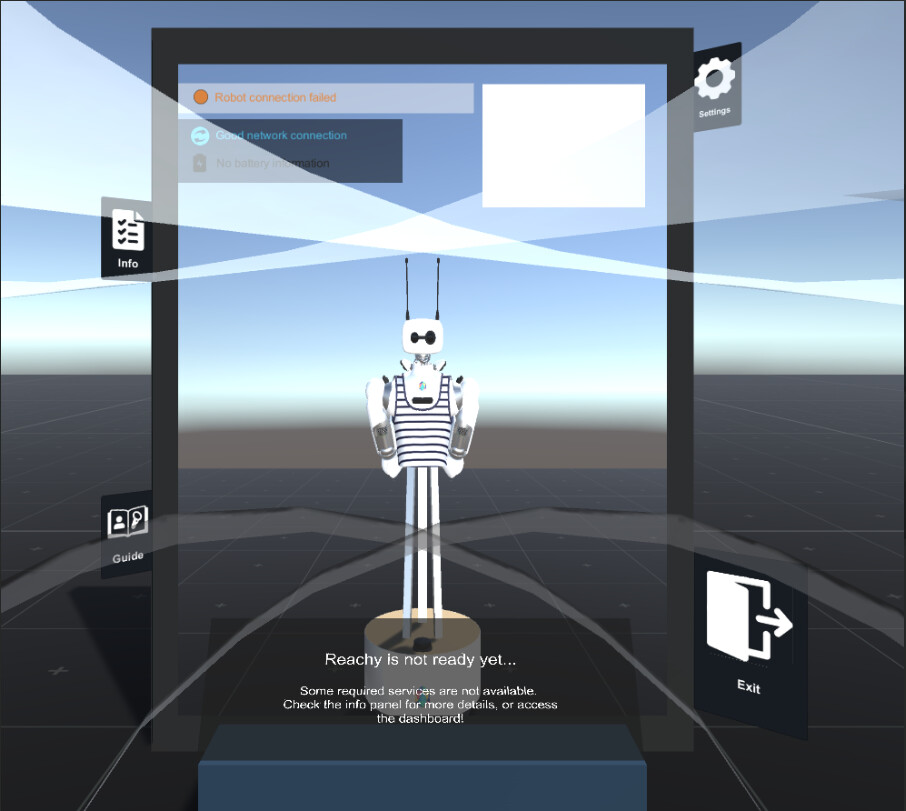
While trying to use the Teleoperation app on a windows computer connected using the horizon link app, and using the full app installer including gstreamer, with the included launch script, I get blocked on the “mirror” screen. The system will successfully connect to the robot and show the camera feed when the Quest headset is not connected, but when the headset is connected, the teleoperation app shows this screen:
then, check that the environment variable PATH contains C:\gstreamer\1.0\msvc_x86_64\bin (default installation) For that, look for “Edit the system environment variables” in the Windows search bar. Then, click on Environment variables. A new window shows up : double click on “Path” in the user variables. If you don’t see the gstreamer variable, select “New” and add the pathway above.
I attempted to ssh into the system, but it seems the user bedrock requires a password. is that listed somewhere?
I also can’t attach files as a new user
looking at the logs from the webrtc service provided by the dashboard, There is no specific connection error as it seems that the teleoperation app does not manage to connect to the system at all while the headset is connected, while it connects just fine when the headset is not connected
I have checked the Gstreamer and Visual C++ instructions and the windows path, and they are al in line with what you describe, but the problem persists.